P3 GrosirSystem analysis + UI design
Sales, purchasing and stock for a wholesale shop
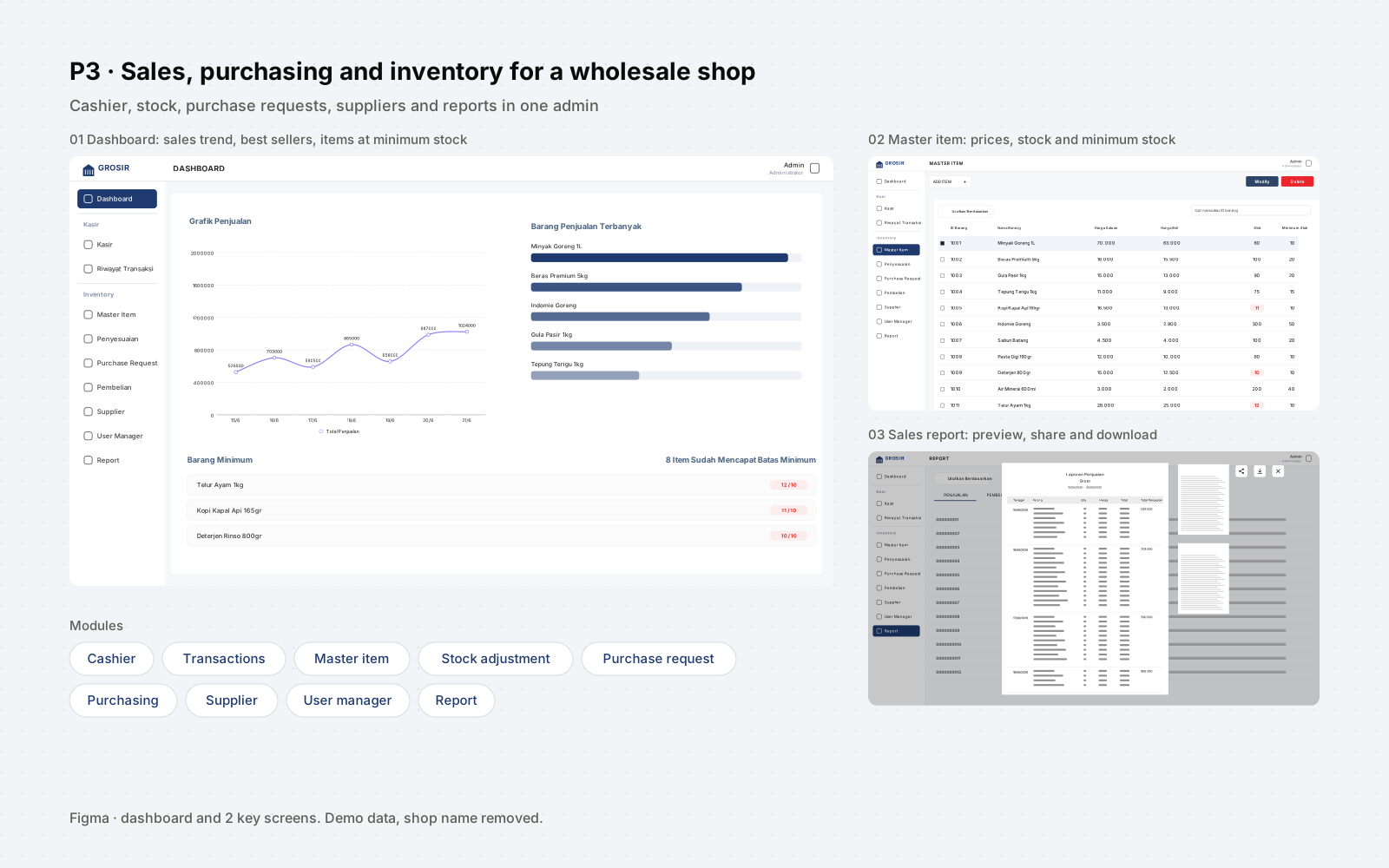
A data flow diagram of how a wholesale shop sells, buys, keeps stock and reports, and the admin screens designed in Figma from it: cashier, master items with minimum stock, stock adjustments, purchase requests, suppliers and reports.
- Role
- Systems analyst and UI designer: data flow diagram and Figma screens
- Status
- Design and analysis
- 4processes: sales, purchasing, inventory, reporting
- 5reports for the owner
- 10admin menus designed in Figma
The deliverables are the data flow diagram and the Figma screens, so there are no usage numbers.
Context
The problem
A wholesale shop sells to customers, buys from suppliers and has to know what is left on the shelf. When those are handled separately, stock figures drift and the owner has no single place to see sales, purchases and items running low. P3 Grosir maps how the three connect before any screen is drawn.
Solution
What we built
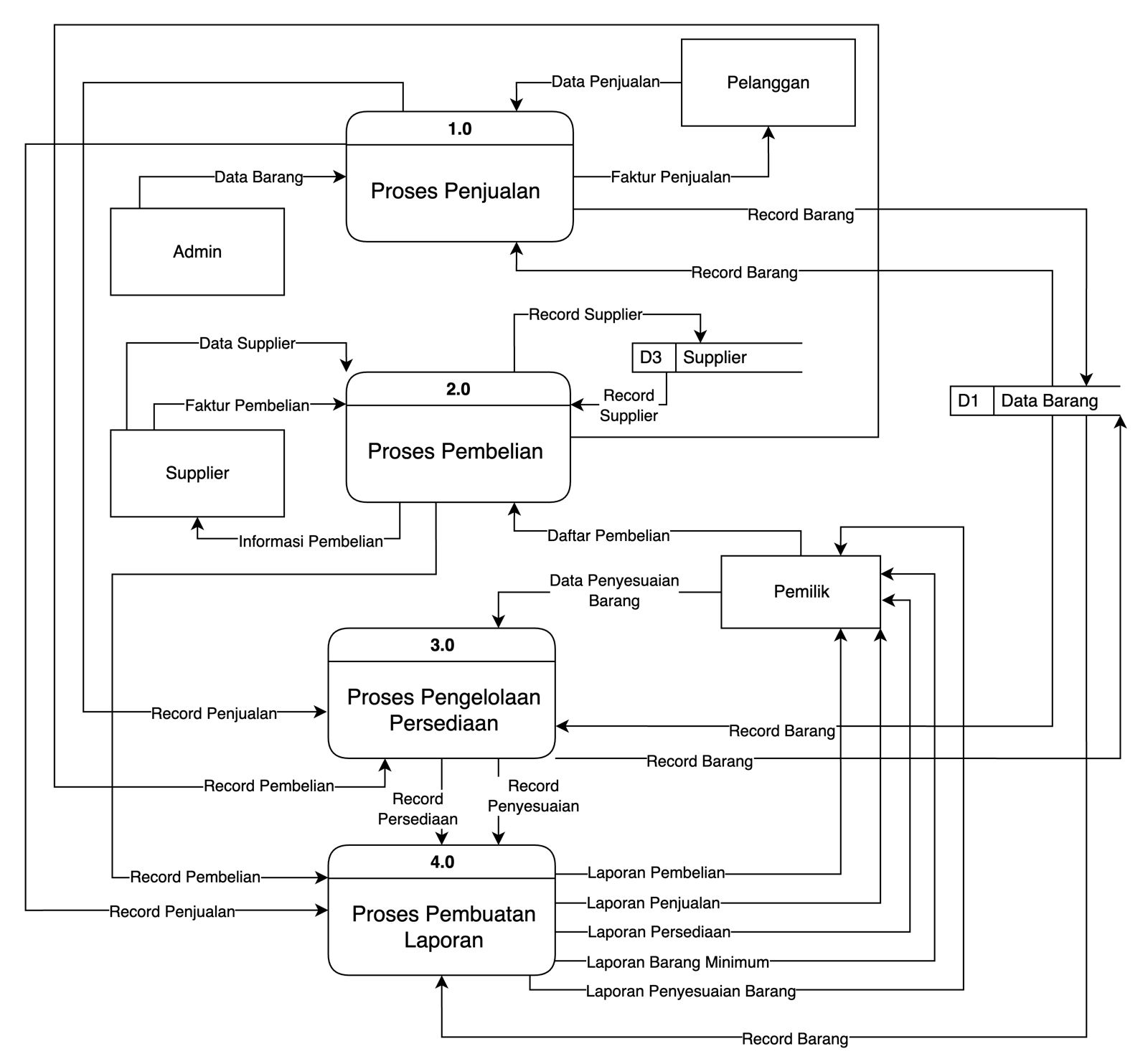
Four processes share one item store. Sales and purchasing both update item records, inventory management combines them with the owner's stock adjustments, and a reporting process turns everything into five reports for the owner. The admin screens follow the same split: cashier and transaction history, master items, stock adjustments, purchase requests, purchasing, suppliers, users and reports.
- System analysis
- Data flow diagram
- Figma
- UI design
- Web
Workflow
The four processes
- 1.0 SalesA customer's purchase is recorded against the item data, the customer gets a sales invoice, and item records are updated.
- 2.0 PurchasingThe owner's purchase list goes to purchasing; the supplier's data and purchase invoice are recorded, and the supplier gets the purchase details.
- 3.0 InventorySales and purchase records, plus the owner's stock adjustments, update the item data.
- 4.0 ReportsSales, purchase, inventory and adjustment records become reports for the owner.
Scope
What's in it
Admin screens (Figma)
- Dashboard: sales chart, best-selling items and items at minimum stock
- Cashier and transaction history
- Master item: buying price, unit price, stock and minimum stock
- Stock adjustment
- Purchase request, purchasing and suppliers
- User manager
- Reports with preview, share and download
Data flow diagram
- External entities: admin, customer, supplier, owner
- Processes: sales, purchasing, inventory management, reporting
- Data stores: item data and suppliers
- Reports: purchasing, sales, inventory, minimum stock, stock adjustment
Decisions
Decisions and trade-offs
Stock changes go through a process
Item data is written by sales, purchasing and inventory management. A manual correction is a stock adjustment from the owner, with its own record and its own report.
Minimum stock is part of every item
Each item has a minimum stock value next to its stock. The dashboard lists the items that reached it, and the owner gets a minimum stock report.
Request before purchase
The owner's purchase list is an input to purchasing, and the screens keep purchase requests apart from recorded purchases.
My role
What I owned
- Mapped the shop's processes in a data flow diagram: four processes, four external entities and two data stores.
- Designed the admin screens in Figma, from the dashboard to the reports.
Artefacts
Have a process that should be a system?
I'm not looking for a new role, but I'm always up for a conversation about a system, a process or a collaboration.