OneTap-SPBDesktop app + NFC
One tap from NFC card to database at the mill weighbridge
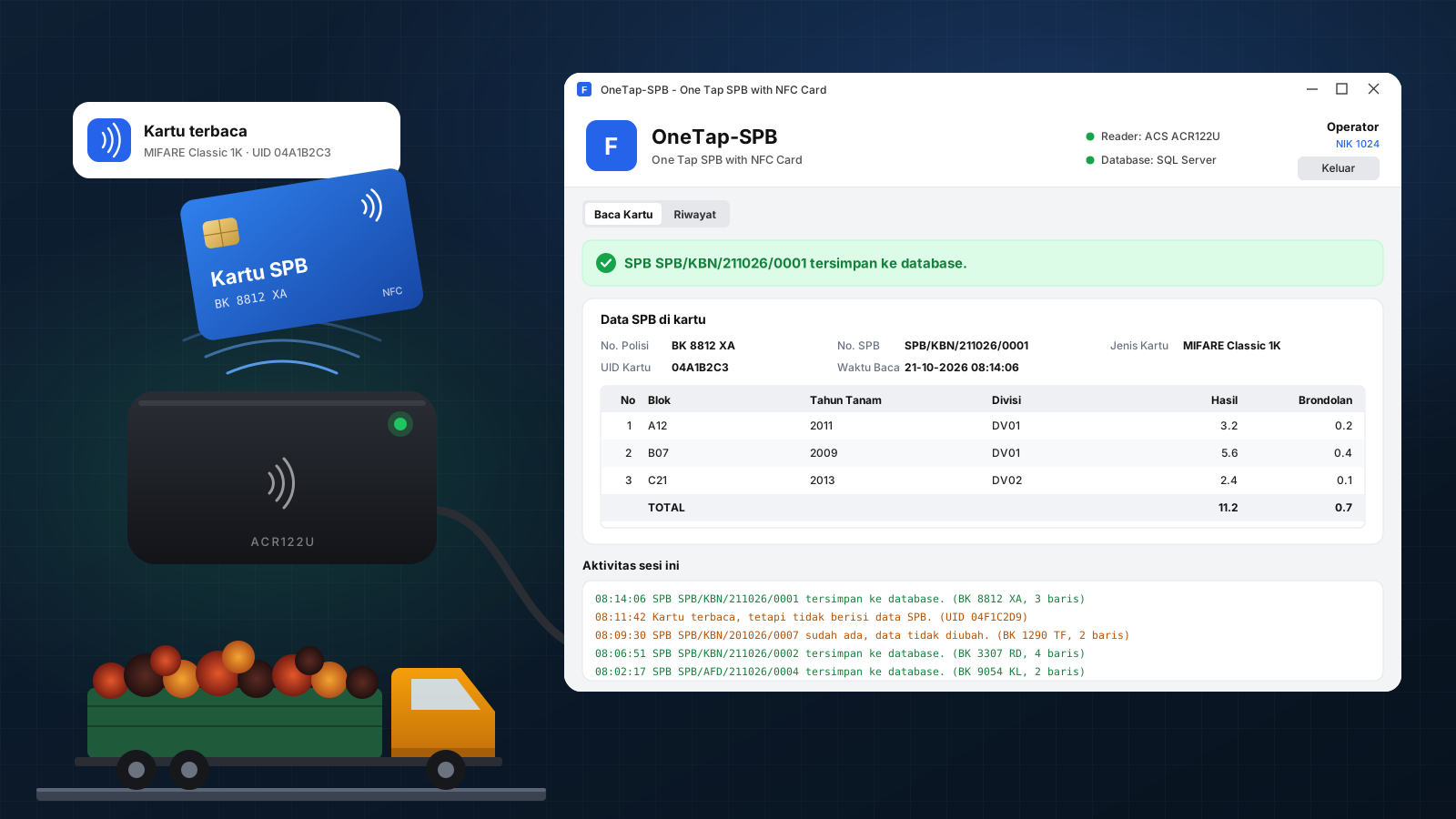
A Windows app at the mill weighbridge that reads a delivery note (SPB) from the NFC card the truck driver brings from the estate, checks it, and saves it to the company database in one tap. No re-typing.
- Role
- Built it end to end: card reading, data layer, desktop UI and packaging
- Period
- 2026
- Status
- Ready to deploy
- 1tap to move a delivery note from card to database
- 0fields typed by hand at the weighbridge
- 3card families supported by the same reader
The app is ready for the weighbridge, so there are no usage numbers yet. What it guarantees is structural: no re-typing, no duplicate notes, and a name and time on every change.
Context
The problem
Every truck of palm fruit leaves the estate with a delivery note (SPB): the truck's plate, the note number and a summary of the harvest per block. The estate writes it to an NFC card and the driver carries it to the mill. At the mill, someone had to get that data into the company system while trucks queued at the weighbridge. Typing it by hand is slow, numbers get mistyped, the same note can be entered twice, and nobody can tell later who entered or changed what.
Solution
What we built
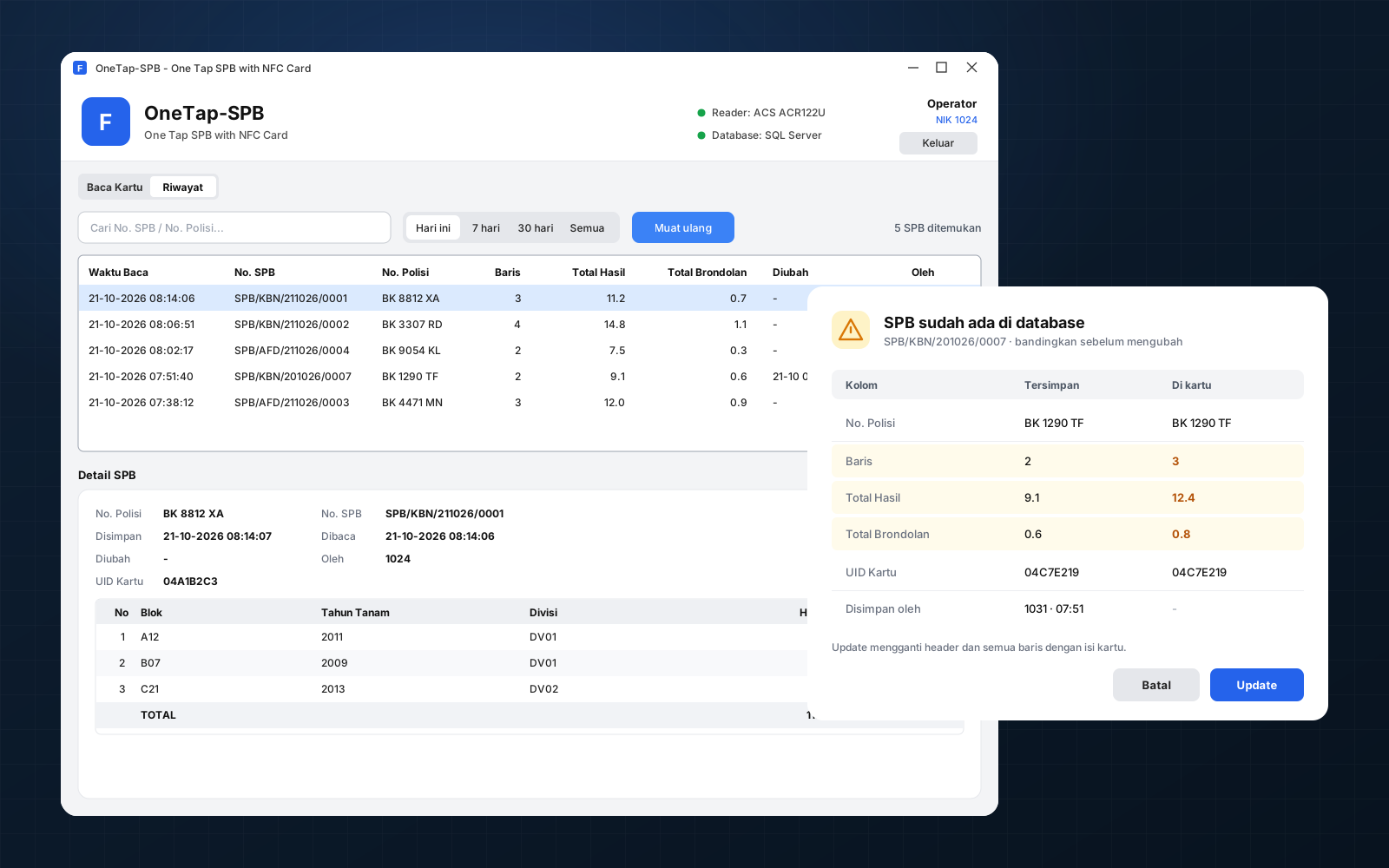
OneTap-SPB runs on the weighbridge PC with a USB NFC reader. The operator signs in with their employee ID, and when a truck arrives they tap the driver's card. The app reads the card, checks every field, and saves the note to SQL Server. If the note is already in the database, it shows the saved data next to the card's data and lets the operator update or keep it. A history tab finds any note by date, note number or plate.
- Python
- CustomTkinter
- PC/SC
- NFC
- ACR122U
- SQL Server
- pyodbc
- PyInstaller
Workflow
From estate to database
- EstateThe delivery note is issued and its text is written to an NFC card. That part runs in another system.
- HaulThe driver carries the fruit and the card to the mill.
- TapAt the weighbridge, the operator taps the card on the reader. The app notices the card on its own.
- CheckThe card is read and parsed. A card with a wrong field is rejected with every error listed at once.
- SaveHeader and harvest rows are saved in one transaction, stamped with the operator's ID and the time.
- FindStaff search the history by date, note number or plate and open the details.
Scope
What's in it
Weighbridge app
- Sign in with the client's own employee table, configured per client
- Live reader and database status in the header
- Read card: card UID, card type, plate, note number and harvest per block with totals
- Duplicate dialog comparing saved data with the card, with Update or Cancel
- Session log of every card read, saved, rejected or skipped
- History with search and Today, 7 days, 30 days or All
Card and data
- MIFARE Ultralight and NTAG, MIFARE Classic, and NFC Forum Type 4 cards
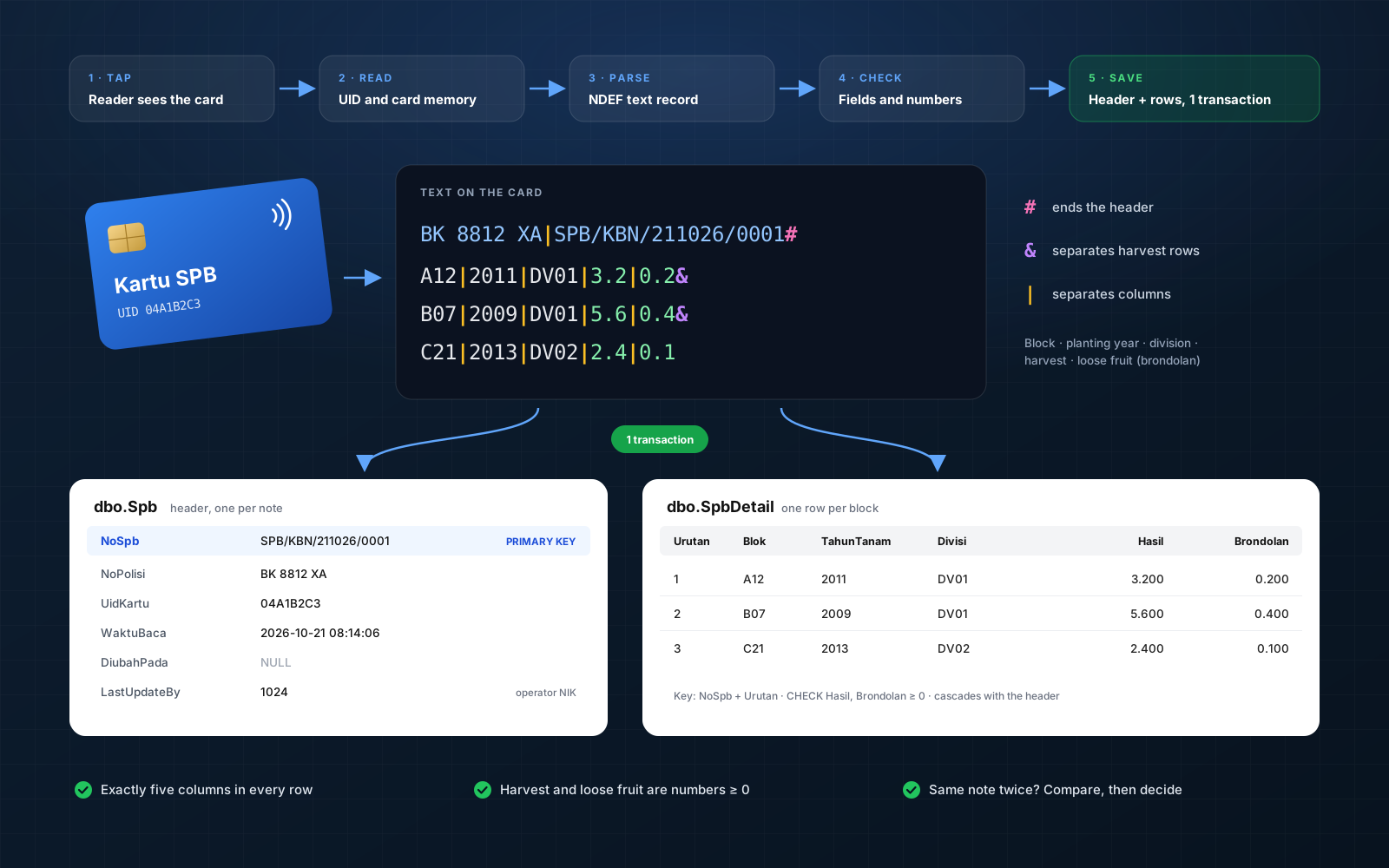
- NDEF text record parsed into a header and a list of harvest rows
- Header and detail tables in SQL Server, with SQL scripts for new installs and migration
- PCs without a reader can still open the history
Business rules
Rules the system enforces
- The note number is the key. The same note is never saved twice.
- Each harvest row has exactly five fields, and harvest and loose fruit must be numbers of zero or more.
- An invalid card is not saved at all.
- Changing a saved note needs the operator's confirmation, and records who did it and when.
- Only registered employees can use the app.
Decisions
Decisions and trade-offs
Talk to the reader directly
The app calls the Windows smart card API (PC/SC) through ctypes, with no third-party NFC library. It watches the reader for cards, reads each card type the right way, and reconnects on its own if the reader is unplugged.
Let the database catch duplicates
The note number is the primary key. A save that hits it opens a comparison instead of failing, so two weighbridge PCs can never create the same note twice.
The screen never freezes
Card reading and queries run on background threads that report to the UI through a queue. Each thread has its own database connection that reconnects when the network drops.
Configure per client, not per build
The database connection and the employee table used for sign-in live in a config file next to the app. A new client or a new server needs an edited file, not a new build.
My role
What I owned
- Mapped the flow from estate to weighbridge and the scope of the app.
- Built card reading over PC/SC for three card families, and the NDEF parser.
- Designed the delivery note format check and the SQL Server schema, with install and migration scripts.
- Built the save, duplicate and update logic in single transactions with parameterised queries.
- Built the desktop UI: sign in, read card, history, duplicate dialog and session log.
- Packaged it as a Windows app with PyInstaller, plus a command-line version for diagnosis.
Artefacts
Have a process that should be a system?
I'm not looking for a new role, but I'm always up for a conversation about a system, a process or a collaboration.